




A breadcrumb is a simple navigation feature that quietly improves both SEO and user experience.
It takes minutes to set up. It helps for years.
And yet, it’s one of the most overlooked improvements on local business websites.
Let’s break it down:
What Is a Breadcrumb in SEO?
Breadcrumbs are the small navigation links you usually see near the top of a page, showing where that page sits within a website.
They typically look like this:
Home > Services > Fuse Box Upgrades
Or for a different type of business:
Home > Blog > Pricing Guides
They’re simple, but very intentional.
Breadcrumbs give both users and search engines a clear trail of how a page fits into the wider site.
Why Breadcrumbs Matter (More Than People Think)
Breadcrumbs do two things extremely well.
They help people navigate your site
People don’t always land on your homepage.
Most visitors arrive deep inside a website – on a service page, blog post, or guide – straight from Google.
Breadcrumbs instantly show:
- where they are
- what category the page belongs to
- how to move up a level without hitting the back button repeatedly
That small improvement reduces friction.
And when it’s easier to move around a site, people tend to stay longer, explore more pages, and trust what they’re reading.
They help Google understand your site structure
Breadcrumbs (alongside good URL structure) also act as structural signals.
They tell Google:
- which pages are top-level
- which pages support others
- how content is grouped together
That makes crawling more efficient and helps Google understand relationships between pages – especially on growing websites with lots of content.
When structure is clear, indexing is cleaner. And clean indexing supports better visibility.
Bonus: Breadcrumbs can improve search results appearance
When breadcrumbs are implemented correctly, Google can display them directly in search results.
So instead of showing a long, messy URL, your listing may appear as something like:
yourdomain.co.uk > Services > Rewiring
This looks cleaner, more professional, and often improves click-through rate – even when rankings stay the same.
How to Add Breadcrumbs to Your Website
The method depends on how your site is built, but for most local businesses, it’s straightforward.
Option 1: Your WordPress Theme May Already Support Breadcrumbs
Many modern WordPress themes include breadcrumb functionality – it’s just turned off by default.
To check:
- Go to Appearance > Customizer
- Look for a “Breadcrumbs” setting (often under Header or General)
- Enable it
- Publish changes
If your theme supports breadcrumbs properly, they’ll now appear automatically near the top of pages.
If not, there’s a reliable fallback.
Option 2: Use an SEO Plugin (Yoast Example)
If you’re using Yoast SEO, it includes a built-in breadcrumb feature that works across most themes.
To enable it:
- Go to Yoast SEO > Settings
- Open the Advanced section
- Click Breadcrumbs
- Enable breadcrumbs and save
The default settings are usually fine for most sites.
To display them, you have two options:
Shortcode method (no code access)
You can place the breadcrumb shortcode directly into a page or template area where you want it to appear.
This works well if you only want breadcrumbs on certain content types.
Theme-level method (global display)
If you want breadcrumbs to appear automatically across your site, you can add the Yoast breadcrumb function to your theme files.
This requires access to files like header.php, page.php, or single.php, depending on your theme.
Once added, breadcrumbs will display consistently across relevant pages.
Option 3: Non-WordPress Sites (Manual HTML)
If your site isn’t built on WordPress, breadcrumbs can still be added manually.
A basic HTML breadcrumb structure looks like this:
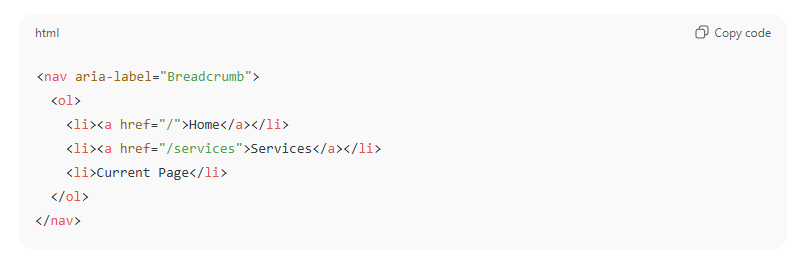
This can be styled lightly with CSS to match your site.
As long as the structure is clear and consistent, both users and search engines can understand it.
1 More Thing: Breadcrumbs Work Best as Part of a Clear Site Structure
Breadcrumbs aren’t a magic ranking switch.
They work best when:
- pages are logically grouped
- categories actually make sense
- URLs reflect structure
- internal links support that hierarchy
If your site is already organised reasonably well, breadcrumbs reinforce that clarity.
If it isn’t, breadcrumbs often highlight where structure could be improved – which is useful insight in itself.
Small Change, Long-Term Benefit
Breadcrumbs are easy to overlook because they’re quiet.
They don’t feel like marketing. They don’t feel like SEO “work”.
But they:
- improve navigation
- support indexing
- reinforce structure
- and make your site easier to understand at a glance
For most Redcar businesses, they’re one of the easiest upgrades you can make with consistent, long-term upside.